Установка
# Set your MCP Router token (Issued when adding a custom app)Описание
<h1 align="center">MCP Router</h1> <h3 align="center">A Unified MCP Server Management App</h3> <div align="center"> [](https://github.com/mcp-router/mcp-router) [](https://discord.com/invite/dwG9jPrhxB) [-@mcp__router-1DA1F2?style=flat&logo=x)](https://x.com/mcp_router) [English | [日本語](https://github.com/mcp-router/mcp-router/blob/main/README_ja.md) | [中文](https://github.com/mcp-router/mcp-router/blob/main/README_zh.md)] </div> ## 🎯 Overview **MCP Router** is a desktop application for simplifies the management of Model Context Protocol (MCP) servers. ### ✨ Key Features - 🌐 **Universal** — Connect to any MCP server - Remote or local servers - Supports DXT, JSON, Manual - 🖥️ **Cross-platform** — Windows and macOS - 🗂 **Context Management** — Keep growing MCP server contexts organized - Group MCP servers into Projects - Manage modes with Workspaces (like browser profiles) - Toggle tools on/off per server ## 🔒 Privacy & Security ### Your Data Stays Local - ✅ **All data is stored locally** - Request logs, configurations, and server data remain on your device - ✅ **Credentials are secure** - API keys and authentication credentials are stored locally and never transmitted externally - ✅ **Complete control** - You have full control over your MCP server connections and data ### Transparency - 🔍 **Auditable** - The desktop application source code is publicly available on GitHub - 🛡️ **Verifiable privacy** - You can verify that your data stays local by examining the application code - 🤝 **Community-driven** - Security improvements and audits are welcomed from the [community](https://discord.com/invite/dwG9jPrhxB) ## 📥 Installation Download from our [releases page](https://github.com/mcp-router/mcp-router/releases). After setting up MCP Router, you can connect to MCP Router using the CLI: ```bash # Set your MCP Router token (Issued when adding a custom app) export MCPR_TOKEN="mcpr_your_token" # To connect to MCP Router, run: npx -y @mcp_router/cli connect # If you want to use project, run: npx -y @mcp_router/cli connect --project <project-name> ``` ## 🚀 Features ### 📊 Centralized Server Management Easily toggle MCP servers on/off, enable/disable individual tools, and organize servers into Projects and Workspaces — all from a single dashboard <img src="https://raw.githubusercontent.com/mcp-router/mcp-router/main/public/images/readme/toggle.png" alt="Server Management" width="600"> <img src="https://raw.githubusercontent.com/mcp-router/mcp-router/main/public/images/readme/tool-toggle.png" alt="Toggle Tool" width="600"> <img src="https://raw.githubusercontent.com/mcp-router/mcp-router/main/public/images/readme/project-management.png" alt="Project Management" width="600"> <img src="https://raw.githubusercontent.com/mcp-router/mcp-router/main/public/images/readme/workspace.png" alt="Workspace Management" width="600"> ### 🌐 Universal Connectivity Add and connect to any MCP server with support for both local and remote servers <img src="https://raw.githubusercontent.com/mcp-router/mcp-router/main/public/images/readme/add-mcp-manual.png" alt="Universal Connectivity" width="600"> ### 🔗 One-Click Integration Seamlessly connect with popular AI tools like Claude, Cline, Windsurf, Cursor, or your custom client <img src="https://raw.githubusercontent.com/mcp-router/mcp-router/main/public/images/readme/token.png" alt="One-Click Integration" width="600"> ### 📈 Comprehensive Logging & Analytics Monitor and display detailed request logs <img src="https://raw.githubusercontent.com/mcp-router/mcp-router/main/public/images/readme/stats.png" alt="Logs and Statistics" width="600"> ## 🤝 Community Join our community to get help, share ideas, and stay updated: - 💬 [Discord Community](https://discord.com/invite/dwG9jPrhxB) - 🐦 [Follow us on X (Twitter)](https://x.com/mcp_router) - ⭐ [Star us on GitHub](https://github.com/mcp-router/mcp-router) [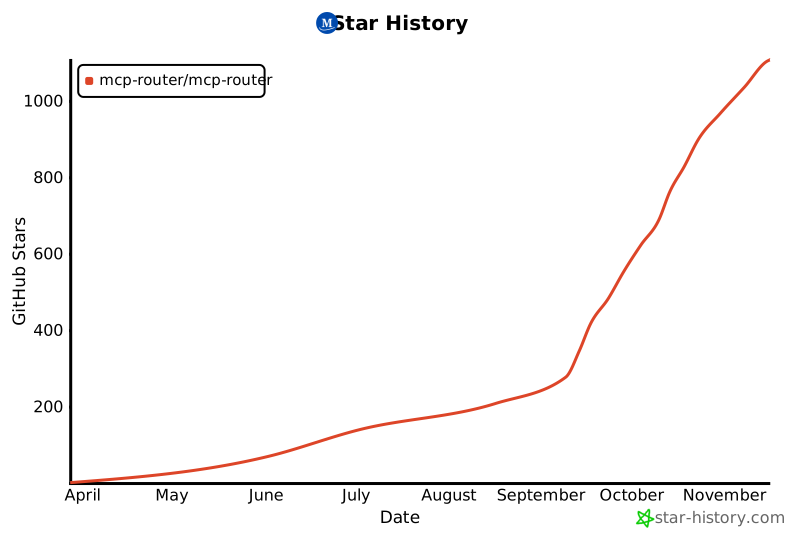](https://www.star-history.com/#mcp-router/mcp-router&type=date&legend=top-left) ## 📝 License This project is licensed under the Sustainable Use License - see the [LICENSE.md](LICENSE.md) file for details.
Отзывы (0)
Пока нет отзывов. Будьте первым!
Статистика
Информация
Технологии
Похожие серверы
mcp-chain-of-draft-server
Chain of Draft Server is a powerful AI-driven tool that helps developers make better decisions through systematic, iterative refinement of thoughts and designs. It integrates seamlessly with popular AI agents and provides a structured approach to reasoning, API design, architecture decisions, code reviews, and implementation planning.
mcp-use-ts
mcp-use is the framework for MCP with the best DX - Build AI agents, create MCP servers with UI widgets, and debug with built-in inspector. Includes client SDK, server SDK, React hooks, and powerful dev tools.
mesh
Define and compose secure MCPs in TypeScript. Generate AI workflows and agents with React + Tailwind UI. Deploy anywhere.
rhinomcp
RhinoMCP connects Rhino 3D to AI Agent through the Model Context Protocol (MCP)