mcp-pandoc
Сообществоот vivekVells
MCP server for document format conversion using pandoc.
Установка
# macOSОписание
[](https://pypi.python.org/pypi/mcp-pandoc) [](https://github.com/vivekVells/mcp-pandoc/actions/workflows/ci.yml) <br />  <!-- [](https://pepy.tech/project/mcp-pandoc) --> <!--  --> <!-- [](https://pypi.python.org/pypi/mcp-pandoc) [](https://github.com/vivekVells/mcp-pandoc/actions/workflows/ci.yml) <a href="https://smithery.ai/server/mcp-pandoc"><img alt="Smithery Badge" src="https://smithery.ai/badge/mcp-pandoc"></a> <a href="https://glama.ai/mcp/servers/xyzzgaj9bk"><img width="380" height="200" src="https://glama.ai/mcp/servers/xyzzgaj9bk/badge" /></a> --> [](https://mseep.ai/app/vivekvells-mcp-pandoc) <a href="https://glama.ai/mcp/servers/xyzzgaj9bk"><img width="380" height="200" src="https://glama.ai/mcp/servers/xyzzgaj9bk/badge" /> # mcp-pandoc: A Document Conversion MCP Server > Officially included in the [Model Context Protocol servers](https://github.com/modelcontextprotocol/servers/blob/main/README.md) open-source project. 🎉 ## Overview A Model Context Protocol server for document format conversion using [pandoc](https://pandoc.org/index.html). This server provides tools to transform content between different document formats while preserving formatting and structure. Please note that mcp-pandoc is currently in early development. PDF support is under development, and the functionality and available tools are subject to change and expansion as we continue to improve the server. Credit: This project uses the [Pandoc Python package](https://pypi.org/project/pandoc/) for document conversion, forming the foundation for this project. ## 📋 Quick Reference **New to mcp-pandoc?** Check out **[📖 CHEATSHEET.md](CHEATSHEET.md)** for - ⚡ Copy-paste examples for all formats - 🔄 Bidirectional conversion matrix - 🎯 Common workflows and pro tips - 🌟 Reference document styling guide _Perfect for quick lookups and getting started fast!_ ## Demo [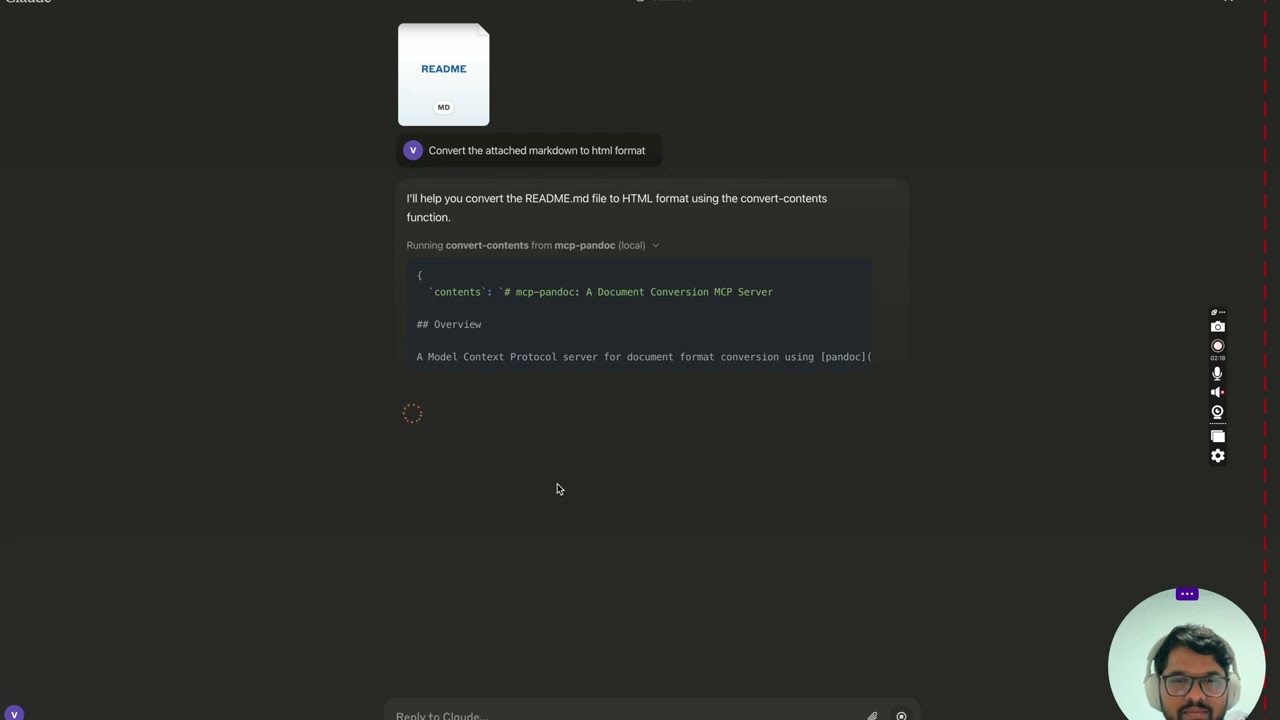](https://youtu.be/vN3VOb0rygM) > 🎥 [Watch on YouTube](https://youtu.be/vN3VOb0rygM) <details> <summary>Screenshots</summary> <img width="2407" alt="Screenshot 2024-12-26 at 3 33 54 PM" src="https://github.com/user-attachments/assets/ce3f5396-252a-4bba-84aa-65b2a06b859e" /> <img width="2052" alt="Screenshot 2024-12-26 at 3 38 24 PM" src="https://github.com/user-attachments/assets/8c525ad1-b184-41ca-b068-7dd34b60b85d" /> <img width="1498" alt="Screenshot 2024-12-26 at 3 40 51 PM" src="https://github.com/user-attachments/assets/a1e0682d-fe44-40b6-9988-bf805627beeb" /> <img width="760" alt="Screenshot 2024-12-26 at 3 41 20 PM" src="https://github.com/user-attachments/assets/1d7f5998-6d7f-48fa-adcf-fc37d0521213" /> <img width="1493" alt="Screenshot 2024-12-26 at 3 50 27 PM" src="https://github.com/user-attachments/assets/97992c5d-8efc-40af-a4c3-94c51c392534" /> </details> More to come... ## Tools 1. `convert-contents` - Transforms content between supported formats - Inputs: - `contents` (string): Source content to convert (required if input_file not provided) - `input_file` (string): Complete path to input file (required if contents not provided) - `input_format` (string): Source format of the content (defaults to markdown) - `output_format` (string): Target format (defaults to markdown) - `output_file` (string): Complete path for output file (required for pdf, docx, rst, latex, epub formats) - `reference_doc` (string): Path to a reference document to use for styling (supported for docx output format) - `defaults_file` (string): Path to a Pandoc defaults file (YAML) containing conversion options - `filters` (array): List of Pandoc filter paths to apply during conversion - Supported input/output formats: - markdown - html - pdf - docx - rst - latex - epub - txt - ipynb - odt - Note: For advanced formats (pdf, docx, rst, latex, epub), an output_file path is required ### 🔧 Advanced Features #### Defaults Files (YAML Configuration) Use defaults files to create reusable conversion templates with consistent formatting: ```yaml # academic-paper.yaml from: markdown to: pdf number-sections: true toc: true metadata: title: "Academic Paper" author: "Research Team" ``` Example usage: `"Convert paper.md to PDF using defaults aca
Отзывы (0)
Пока нет отзывов. Будьте первым!
Статистика
Информация
Технологии
Похожие серверы

GitHub MCP
Полная интеграция с GitHub API: репозитории, issues, pull requests, actions и многое другое.
Filesystem MCP
Безопасный доступ к файловой системе для чтения, записи и управления файлами с настраиваемыми разрешениями.

Context7 MCP
Доступ к актуальной документации библиотек и фреймворков.
Serena MCP
Мощный MCP сервер для семантической навигации по коду и рефакторинга.