mcp-alchemy
Сообществоот runekaagaard
A MCP (model context protocol) server that gives the LLM access to and knowledge about relational databases like SQLite, Postgresql, MySQL & MariaDB, Oracle, and MS-SQL.
Установка
git clone git@github.com:runekaagaard/mcp-alchemy.gitОписание
# MCP Alchemy <a href="https://www.pulsemcp.com/servers/runekaagaard-alchemy"><img src="https://www.pulsemcp.com/badge/top-pick/runekaagaard-alchemy" width="400" alt="PulseMCP Badge"></a> **Status: Works great and is in daily use without any known bugs.** **Status2: I just added the package to PyPI and updated the usage instructions. Please report any issues :)** Let Claude be your database expert! MCP Alchemy connects Claude Desktop directly to your databases, allowing it to: - Help you explore and understand your database structure - Assist in writing and validating SQL queries - Displays relationships between tables - Analyze large datasets and create reports - Claude Desktop Can analyse and create artifacts for very large datasets using [claude-local-files](https://github.com/runekaagaard/claude-local-files). Works with PostgreSQL, MySQL, MariaDB, SQLite, Oracle, MS SQL Server, CrateDB, Vertica, and a host of other [SQLAlchemy-compatible](https://docs.sqlalchemy.org/en/20/dialects/) databases. 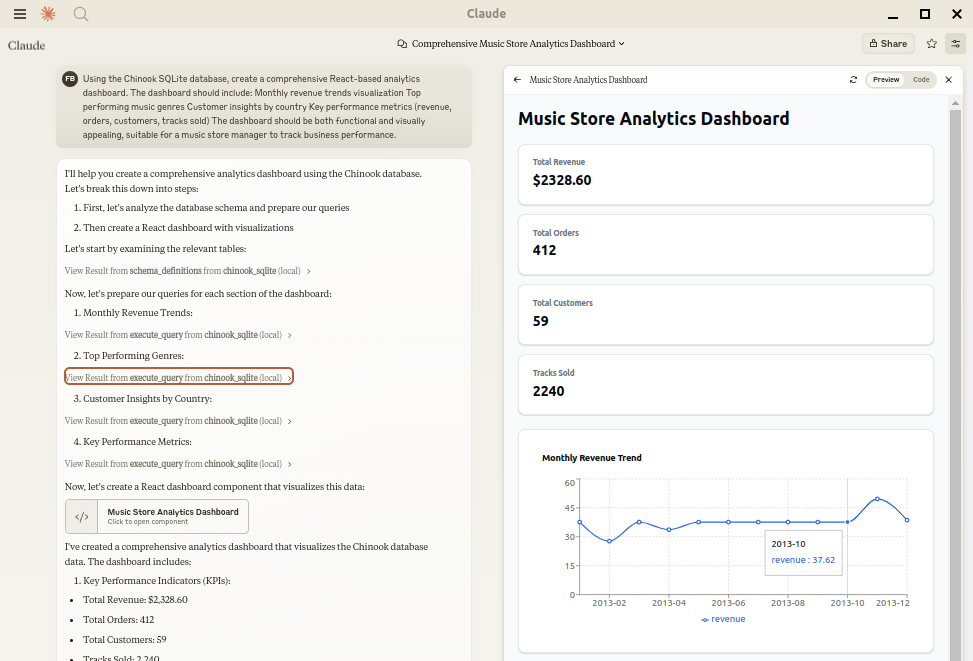 ## Installation Ensure you have uv installed: ```bash # Install uv if you haven't already curl -LsSf https://astral.sh/uv/install.sh | sh ``` ## Usage with Claude Desktop Add to your `claude_desktop_config.json`. You need to add the appropriate database driver in the ``--with`` parameter. _Note: After a new version release there might be a period of up to 600 seconds while the cache clears locally cached causing uv to raise a versioning error. Restarting the MCP client once again solves the error._ ### SQLite (built into Python) ```json { "mcpServers": { "my_sqlite_db": { "command": "uvx", "args": ["--from", "mcp-alchemy==2025.8.15.91819", "--refresh-package", "mcp-alchemy", "mcp-alchemy"], "env": { "DB_URL": "sqlite:////absolute/path/to/database.db" } } } } ``` ### PostgreSQL ```json { "mcpServers": { "my_postgres_db": { "command": "uvx", "args": ["--from", "mcp-alchemy==2025.8.15.91819", "--with", "psycopg2-binary", "--refresh-package", "mcp-alchemy", "mcp-alchemy"], "env": { "DB_URL": "postgresql://user:password@localhost/dbname" } } } } ``` ### MySQL/MariaDB ```json { "mcpServers": { "my_mysql_db": { "command": "uvx", "args": ["--from", "mcp-alchemy==2025.8.15.91819", "--with", "pymysql", "--refresh-package", "mcp-alchemy", "mcp-alchemy"], "env": { "DB_URL": "mysql+pymysql://user:password@localhost/dbname" } } } } ``` ### Microsoft SQL Server ```json { "mcpServers": { "my_mssql_db": { "command": "uvx", "args": ["--from", "mcp-alchemy==2025.8.15.91819", "--with", "pymssql", "--refresh-package", "mcp-alchemy", "mcp-alchemy"], "env": { "DB_URL": "mssql+pymssql://user:password@localhost/dbname" } } } } ``` ### Oracle ```json { "mcpServers": { "my_oracle_db": { "command": "uvx", "args": ["--from", "mcp-alchemy==2025.8.15.91819", "--with", "oracledb", "--refresh-package", "mcp-alchemy", "mcp-alchemy"], "env": { "DB_URL": "oracle+oracledb://user:password@localhost/dbname" } } } } ``` ### CrateDB ```json { "mcpServers": { "my_cratedb": { "command": "uvx", "args": ["--from", "mcp-alchemy==2025.8.15.91819", "--with", "sqlalchemy-cratedb>=0.42.0.dev1", "--refresh-package", "mcp-alchemy", "mcp-alchemy"], "env": { "DB_URL": "crate://user:password@localhost:4200/?schema=testdrive" } } } } ``` For connecting to CrateDB Cloud, use a URL like `crate://user:password@example.aks1.westeurope.azure.cratedb.net:4200?ssl=true`. ### Vertica ```json { "mcpServers": { "my_vertica_db": { "command": "uvx", "args": ["--from", "mcp-alchemy==2025.8.15.91819", "--with", "vertica-python", "--refresh-package", "mcp-alchemy", "mcp-alchemy"], "env": { "DB_URL": "vertica+vertica_python://user:password@localhost:5433/dbname", "DB_ENGINE_OPTIONS": "{\"connect_args\": {\"ssl\": false}}" } } } } ``` ## Environment Variables - `DB_URL`: SQLAlchemy [database URL](https://docs.sqlalchemy.org/en/20/core/engines.html#database-urls) (required) - `CLAUDE_LOCAL_FILES_PATH`: Directory for full result sets (optional) - `EXECUTE_QUERY_MAX_CHARS`: Maximum output length (optional, default 4000) - `DB_ENGINE_OPTIONS`: JSON string containing additional SQLAlchemy engine options (optional) ## Connection Pooling MCP Alchemy uses connection pooling optimized for long-running MCP servers. The default settings are: - `pool_pre_ping=True`: Tests connections before use to handle database timeouts and network issues - `pool_size=1`: Maintains 1 persistent connection (MCP servers typically handle one request at a time) - `
Отзывы (0)
Пока нет отзывов. Будьте первым!
Статистика
Информация
Технологии
Похожие серверы

Supabase MCP
Интеграция с Supabase - open-source альтернативой Firebase с PostgreSQL.

PostgreSQL MCP
Прямой доступ к PostgreSQL базам данных: запросы, схемы, миграции.

SQLite MCP
Работа с SQLite базами данных: запросы, создание таблиц, анализ данных.

Redis MCP
Интеграция с Redis: работа с ключами, структурами данных, pub/sub.