apify-mcp-server
Сообществоот apify
The Apify MCP server enables your AI agents to extract data from social media, search engines, maps, e-commerce sites, or any other website using thousands of ready-made scrapers, crawlers, and automation tools available on the Apify Store.
Установка
npx @apify/actors-mcp-server --tools actors,docs,apify/rag-web-browserОписание
<h1 align="center"> <a href="https://mcp.apify.com"> <picture> <source media="(prefers-color-scheme: dark)" srcset="https://raw.githubusercontent.com/apify/apify-mcp-server/refs/heads/master/docs/apify_mcp_server_dark_background.png"> <img alt="Apify MCP Server" src="https://raw.githubusercontent.com/apify/apify-mcp-server/refs/heads/master/docs/apify_mcp_server_white_background.png" width="500"> </picture> </a> <br> <small><a href="https://mcp.apify.com">mcp.apify.com</a></small> </h1> <p align=center> <a href="https://www.npmjs.com/package/@apify/actors-mcp-server" rel="nofollow"><img src="https://img.shields.io/npm/v/@apify/actors-mcp-server.svg" alt="NPM latest version" data-canonical-src="https://img.shields.io/npm/v/@apify/actors-mcp-server.svg" style="max-width: 100%;"></a> <a href="https://www.npmjs.com/package/@apify/actors-mcp-server" rel="nofollow"><img src="https://img.shields.io/npm/dm/@apify/actors-mcp-server.svg" alt="Downloads" data-canonical-src="https://img.shields.io/npm/dm/@apify/actors-mcp-server.svg" style="max-width: 100%;"></a> <a href="https://github.com/apify/actors-mcp-server/actions/workflows/check.yaml"><img src="https://github.com/apify/actors-mcp-server/actions/workflows/check.yaml/badge.svg?branch=master" alt="Build Status" style="max-width: 100%;"></a> <a href="https://apify.com/apify/actors-mcp-server"><img src="https://apify.com/actor-badge?actor=apify/actors-mcp-server" alt="Actor runs" style="max-width: 100%;"></a> </p> The Apify Model Context Protocol (MCP) server at [**mcp.apify.com**](https://mcp.apify.com) enables your AI agents to extract data from social media, search engines, maps, e-commerce sites, or any other website using thousands of ready-made scrapers, crawlers, and automation tools available on the [Apify Store](https://apify.com/store). > **🚀 Try the hosted Apify MCP Server!** > > For the easiest setup and most powerful features, including the ability to find and use any Actor from Apify Store, connect your AI assistant to our hosted server: > > **[`https://mcp.apify.com`](https://mcp.apify.com)** > > It supports OAuth, so you can connect from clients like Claude.ai or Visual Studio Code with just the URL. 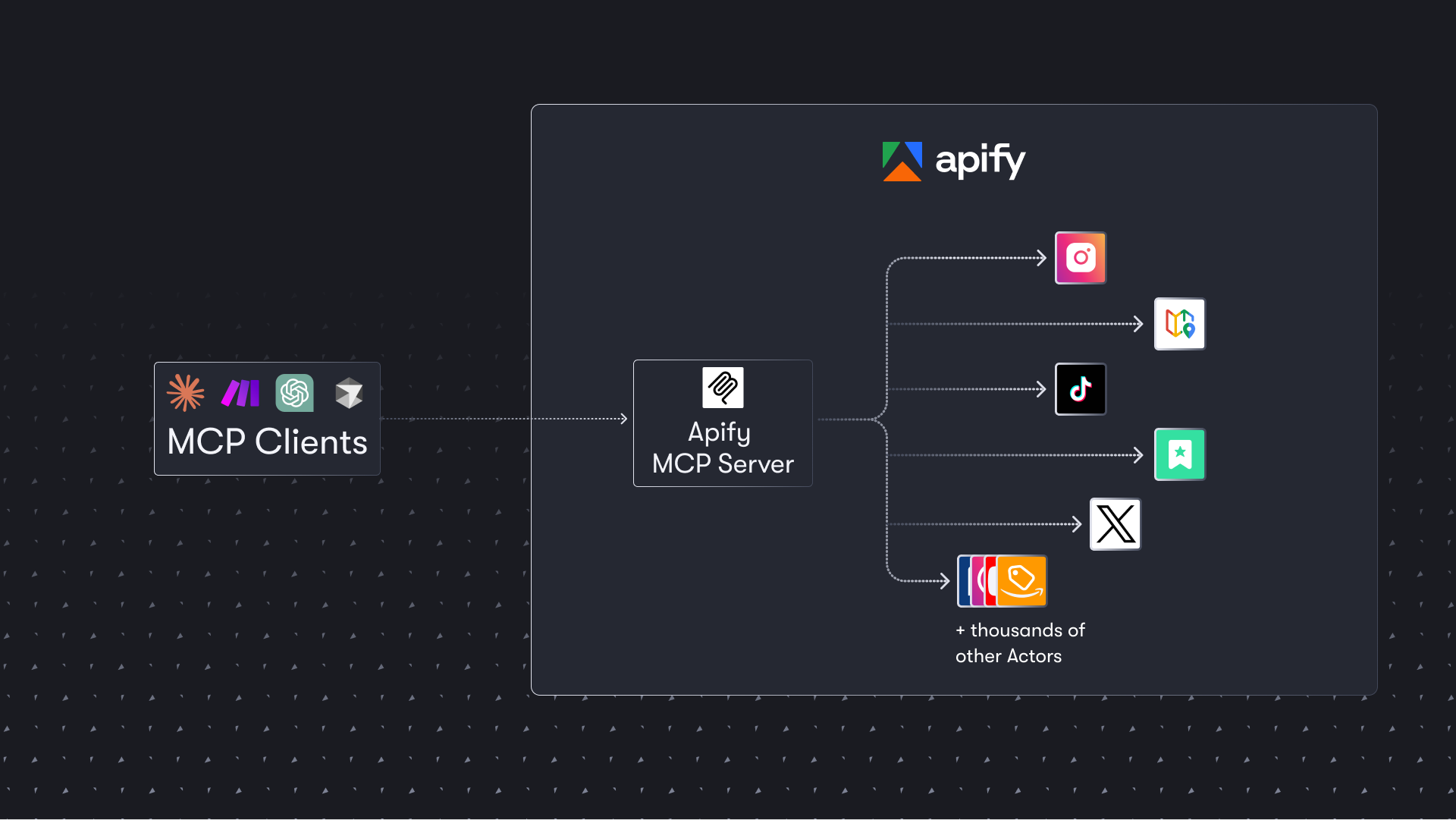 ## Table of Contents - [🌐 Introducing the Apify MCP server](#-introducing-the-apify-mcp-server) - [🚀 Quickstart](#-quickstart) - [🤖 MCP clients](#-mcp-clients) - [🪄 Try Apify MCP instantly](#-try-apify-mcp-instantly) - [🛠️ Tools, resources, and prompts](#-tools-resources-and-prompts) - [📊 Telemetry](#-telemetry) - [🐛 Troubleshooting (local MCP server)](#-troubleshooting-local-mcp-server) - [⚙️ Development](#-development) - [🤝 Contributing](#-contributing) - [📚 Learn more](#-learn-more) # 🌐 Introducing the Apify MCP server The Apify MCP Server allows an AI assistant to use any [Apify Actor](https://apify.com/store) as a tool to perform a specific task. For example, it can: - Use [Facebook Posts Scraper](https://apify.com/apify/facebook-posts-scraper) to extract data from Facebook posts from multiple pages/profiles. - Use [Google Maps Email Extractor](https://apify.com/lukaskrivka/google-maps-with-contact-details) to extract contact details from Google Maps. - Use [Google Search Results Scraper](https://apify.com/apify/google-search-scraper) to scrape Google Search Engine Results Pages (SERPs). - Use [Instagram Scraper](https://apify.com/apify/instagram-scraper) to scrape Instagram posts, profiles, places, photos, and comments. - Use [RAG Web Browser](https://apify.com/apify/web-scraper) to search the web, scrape the top N URLs, and return their content. **Video tutorial: Integrate 8,000+ Apify Actors and Agents with Claude** [](https://www.youtube.com/watch?v=BKu8H91uCTg) # 🚀 Quickstart You can use the Apify MCP Server in two ways: **HTTPS Endpoint (mcp.apify.com)**: Connect from your MCP client via OAuth or by including the `Authorization: Bearer <APIFY_TOKEN>` header in your requests. This is the recommended method for most use cases. Because it supports OAuth, you can connect from clients like [Claude.ai](https://claude.ai) or [Visual Studio Code](https://code.visualstudio.com/) using just the URL: `https://mcp.apify.com`. - `https://mcp.apify.com` streamable transport **Standard Input/Output (stdio)**: Ideal for local integrations and command-line tools like the Claude for Desktop client. - Set the MCP client server command to `npx @apify/actors-mcp-server` and the `APIFY_TOKEN` environment variable to your Apify API token. - See `npx @apify/actors-mcp-server --help` for more options. You can find detailed instructions for setting up the MCP server in the [Apify documentation](https://docs.apify.com/p
Отзывы (0)
Пока нет отзывов. Будьте первым!
Статистика
Информация
Технологии
Похожие серверы
mcp-chain-of-draft-server
Chain of Draft Server is a powerful AI-driven tool that helps developers make better decisions through systematic, iterative refinement of thoughts and designs. It integrates seamlessly with popular AI agents and provides a structured approach to reasoning, API design, architecture decisions, code reviews, and implementation planning.
mcp-use-ts
mcp-use is the framework for MCP with the best DX - Build AI agents, create MCP servers with UI widgets, and debug with built-in inspector. Includes client SDK, server SDK, React hooks, and powerful dev tools.
mesh
Define and compose secure MCPs in TypeScript. Generate AI workflows and agents with React + Tailwind UI. Deploy anywhere.
rhinomcp
RhinoMCP connects Rhino 3D to AI Agent through the Model Context Protocol (MCP)