ableton-live-mcp-server
Сообществоот Simon-Kansara
MCP Server implementation for Ableton Live OSC control
Описание
# Ableton Live MCP Server ## 📌 Overview The **Ableton Live MCP Server** is a server implementing the [Model Context Protocol (MCP)](https://modelcontextprotocol.io) to facilitate communication between LLMs and **Ableton Live**. It uses **OSC (Open Sound Control)** to send and receive messages to/from Ableton Live. It is based on [AbletonOSC](https://github.com/ideoforms/AbletonOSC) implementation and exhaustively maps available OSC adresses to [**tools**](https://modelcontextprotocol.io/docs/concepts/tools) accessible to MCP clients. [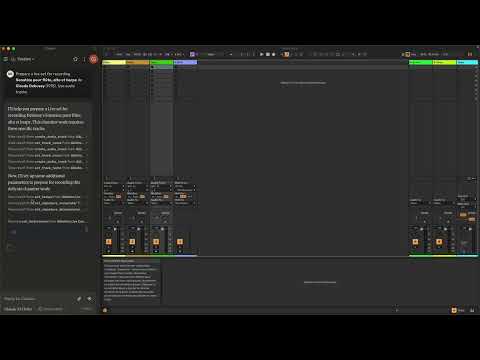](https://www.youtube.com/watch?v=12MzsQ3V7cs) This project consists of two main components: - `mcp_ableton_server.py`: The MCP server handling the communication between clients and the OSC daemon. - `osc_daemon.py`: The OSC daemon responsible for relaying commands to Ableton Live and processing responses. ## ✨ Features - Provides an MCP-compatible API for controlling Ableton Live from MCP clients. - Uses **python-osc** for sending and receiving OSC messages. - Based on the OSC implementation from [AbletonOSC](https://github.com/ideoforms/AbletonOSC). - Implements request-response handling for Ableton Live commands. ## ⚡ Installation ### Requirements - Python 3.8+ - `python-osc` (for OSC communication) - `fastmcp` (for MCP support) - `uv` (recommended Python package installer) - [AbletonOSC](https://github.com/ideoforms/AbletonOSC) as a control surface ### Installation Steps 1. Install `uv` (https://docs.astral.sh/uv/getting-started/installation): ```bash curl -LsSf https://astral.sh/uv/install.sh | sh ``` 2. Clone the repository: ```bash git clone https://github.com/your-username/mcp_ableton_server.git cd mcp_ableton_server ``` 3. Install the project and its dependencies: ```bash uv sync ``` 4. Install AbletonOSC Follow the instructions at [AbletonOSC](https://github.com/ideoforms/AbletonOSC) ## 🚀 Usage ### Running the OSC Daemon The OSC daemon will handle OSC communication between the MCP server and Ableton Live: ```bash uv run osc_daemon.py ``` This will: - Listen for MCP client connections on port **65432**. - Forward messages to Ableton Live via OSC on port **11000**. - Receive OSC responses from Ableton on port **11001**. ### Example Usage In Claude desktop, ask Claude: - _Prepare a set to record a rock band_ - _Set the input routing channel of all tracks that have "voice" in their name to Ext. In 2_ ## ⚙️ Configuration By default, the server and daemon run on **localhost (127.0.0.1)** with the following ports: - **MCP Server Socket:** 65432 - **Ableton Live OSC Port (Send):** 11000 - **Ableton Live OSC Port (Receive):** 11001 To modify these, edit the `AbletonOSCDaemon` class in `osc_daemon.py`: ```python self.socket_host = '127.0.0.1' self.socket_port = 65432 self.ableton_host = '127.0.0.1' self.ableton_port = 11000 self.receive_port = 11001 ``` ### Claude Desktop Configuration To use this server with Claude Desktop, you need to configure it in your Claude Desktop settings. The configuration file location varies by operating system: - macOS: `~/Library/Application Support/Claude/claude_desktop_config.json` - Windows: `%APPDATA%/Claude/claude_desktop_config.json` Add the following configuration to your `mcpServers` section: ```json { "mcpServers": { "Ableton Live Controller": { "command": "/path/to/your/project/.venv/bin/python", "args": ["/path/to/your/project/mcp_ableton_server.py"] } } ``` This configuration ensures that: - The server runs with all dependencies properly managed - The project remains portable and reproducible ## Contributing Feel free to submit issues, feature requests, or pull requests to improve this project. ## License This project is licensed under the **MIT License**. See the `LICENSE` file for details. ## Acknowledgments - [Model Context Protocol (MCP)](https://modelcontextprotocol.io) - [python-osc](https://github.com/attwad/python-osc) for OSC handling - Daniel John Jones for OSC implementation with [AbletonOSC](https://github.com/ideoforms/AbletonOSC) - Ableton Third Party Remote Scripts - Julien Bayle @[Structure Void](https://structure-void.com/) for endless inspirations and resources. ## TODO - Explore _resources_ and _prompts_ primitives opportunities. - Build a standalone Ableton Live MCP client. ---
Отзывы (0)
Пока нет отзывов. Будьте первым!
Статистика
Информация
Технологии
Похожие серверы

GitHub MCP
Полная интеграция с GitHub API: репозитории, issues, pull requests, actions и многое другое.
Filesystem MCP
Безопасный доступ к файловой системе для чтения, записи и управления файлами с настраиваемыми разрешениями.

Context7 MCP
Доступ к актуальной документации библиотек и фреймворков.
Serena MCP
Мощный MCP сервер для семантической навигации по коду и рефакторинга.